> ## Documentation Index
> Fetch the complete documentation index at: https://docs.pickcel.com/llms.txt
> Use this file to discover all available pages before exploring further.
# What reports does Pickcel offer?
> Pickcel offers media playback (Proof of Play), screen uptime, and audit log reports. See what each report shows and how to generate and download them.
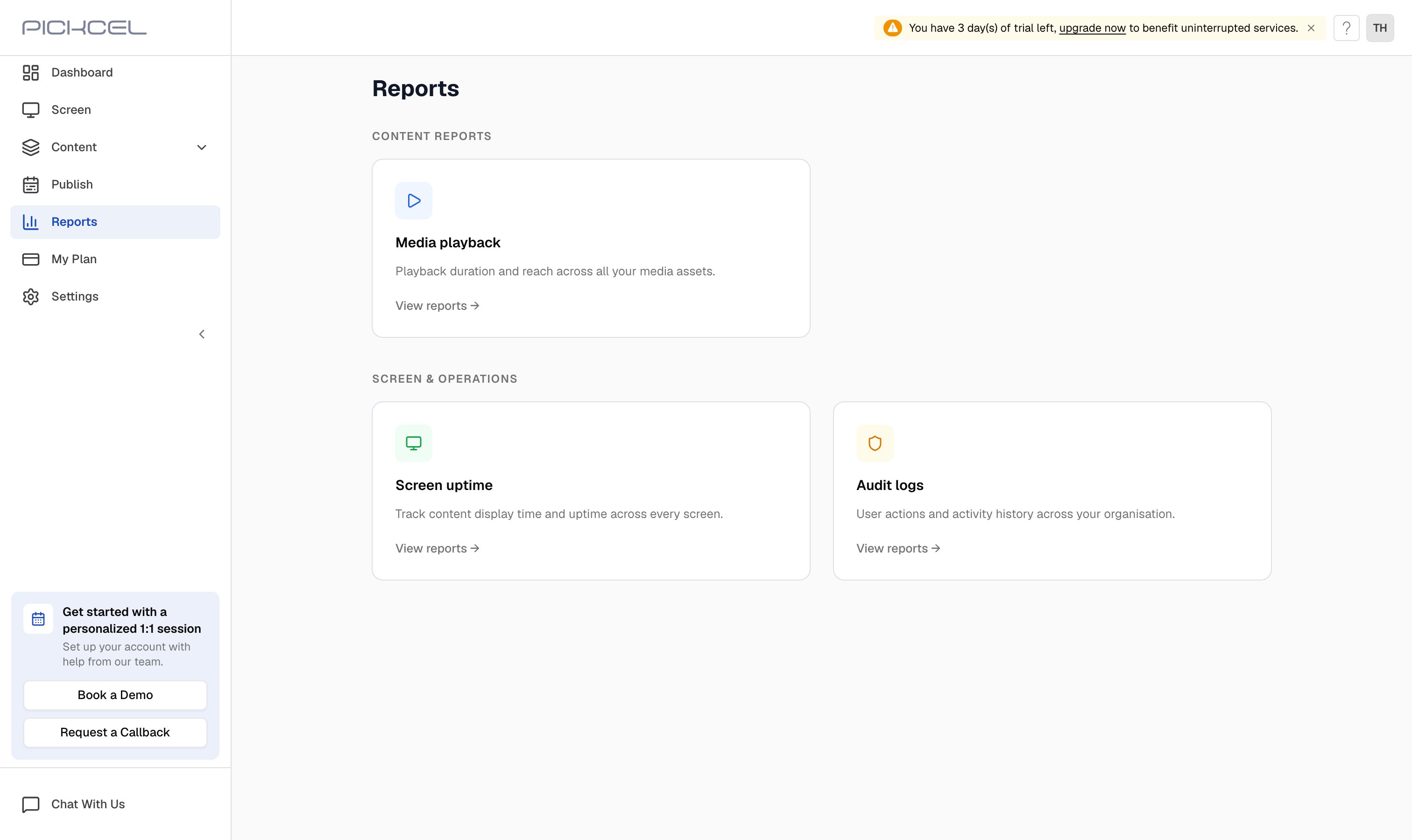
Pickcel gives you **Proof of Play** and activity reporting out of the box. The **Reports** module in the [Pickcel console](https://console.pickcel.com) is a hub grouped into **Content Reports** and **Screen & Operations**. From here you can see how often your media played, how long your screens were displaying content, and what actions users took in your account. Reports can be generated for a specific day, month, or custom date range, and downloaded as a **.csv** file.
 ## Types of reports
| Report | Category | What it shows |
| :----------------- | :------------------ | :------------------------------------------------------------------------------------------------------------------- |
| **Media playback** | Content Reports | How many times each media file (images, videos, apps, PDFs) was played and the duration of each, your Proof of Play. |
| **Screen uptime** | Screen & Operations | How long each screen was online and actively displaying content. |
| **Audit logs** | Screen & Operations | Activities performed by users in your console: sign-ins, schedule changes, composition updates, and more. |
If you use the **Campaign app**, a **Campaign Report** also appears as a Proof of Play for campaign content, broken down by campaign, media, composition, and screen. It only shows up once you have created campaigns.
## Generating a report
Open the **Reports** module and click **View reports** on the report you want.
* **Media playback** opens a list of saved reports. Click **Generate Report**, choose the media files, pick a month or custom range, and generate. Each report is added to the list to review and download.
* **Screen uptime** and **Audit logs** open straight to a period picker. Choose **Daily**, **Monthly**, or **Custom**, then click **Continue** to see the results on screen.
Once a report is generated you can review it on screen and download it as a **.csv** file for your records.
Pickcel focuses on playback and activity reporting (Proof of Play, uptime, and audit logs) rather than broader audience analytics. For each report's exact steps, see the detailed guides below.
## Explore each report
See how many times each media file played and for how long, your Proof of Play.
Track how long your screens were online and displaying content (Screen uptime).
Review the actions users performed across your console.
Get a live, at-a-glance overview of screens, content, and storage.
## Frequently asked questions
Yes. The **Media playback** report is your Proof of Play: it shows how many times each image, video, app, or PDF was played and the duration of each playback. You can generate it for any month or custom range and download it as a .csv file.
Pickcel provides playback and activity reporting, media usage (Proof of Play), screen uptime, and audit logs, rather than broader audience analytics. These reports let you monitor how often content played and how long your screens were running.
Yes. After generating a report, you can download it as a **.csv** file to keep records or analyze the data in a spreadsheet.
Reports can be generated **Daily** (a single date), **Monthly** (a chosen month), or **Custom** (a date range you specify). Media playback supports Monthly and Custom ranges.
## Types of reports
| Report | Category | What it shows |
| :----------------- | :------------------ | :------------------------------------------------------------------------------------------------------------------- |
| **Media playback** | Content Reports | How many times each media file (images, videos, apps, PDFs) was played and the duration of each, your Proof of Play. |
| **Screen uptime** | Screen & Operations | How long each screen was online and actively displaying content. |
| **Audit logs** | Screen & Operations | Activities performed by users in your console: sign-ins, schedule changes, composition updates, and more. |
If you use the **Campaign app**, a **Campaign Report** also appears as a Proof of Play for campaign content, broken down by campaign, media, composition, and screen. It only shows up once you have created campaigns.
## Generating a report
Open the **Reports** module and click **View reports** on the report you want.
* **Media playback** opens a list of saved reports. Click **Generate Report**, choose the media files, pick a month or custom range, and generate. Each report is added to the list to review and download.
* **Screen uptime** and **Audit logs** open straight to a period picker. Choose **Daily**, **Monthly**, or **Custom**, then click **Continue** to see the results on screen.
Once a report is generated you can review it on screen and download it as a **.csv** file for your records.
Pickcel focuses on playback and activity reporting (Proof of Play, uptime, and audit logs) rather than broader audience analytics. For each report's exact steps, see the detailed guides below.
## Explore each report
See how many times each media file played and for how long, your Proof of Play.
Track how long your screens were online and displaying content (Screen uptime).
Review the actions users performed across your console.
Get a live, at-a-glance overview of screens, content, and storage.
## Frequently asked questions
Yes. The **Media playback** report is your Proof of Play: it shows how many times each image, video, app, or PDF was played and the duration of each playback. You can generate it for any month or custom range and download it as a .csv file.
Pickcel provides playback and activity reporting, media usage (Proof of Play), screen uptime, and audit logs, rather than broader audience analytics. These reports let you monitor how often content played and how long your screens were running.
Yes. After generating a report, you can download it as a **.csv** file to keep records or analyze the data in a spreadsheet.
Reports can be generated **Daily** (a single date), **Monthly** (a chosen month), or **Custom** (a date range you specify). Media playback supports Monthly and Custom ranges.